開源圖表引擎
Walk-forward 視窗
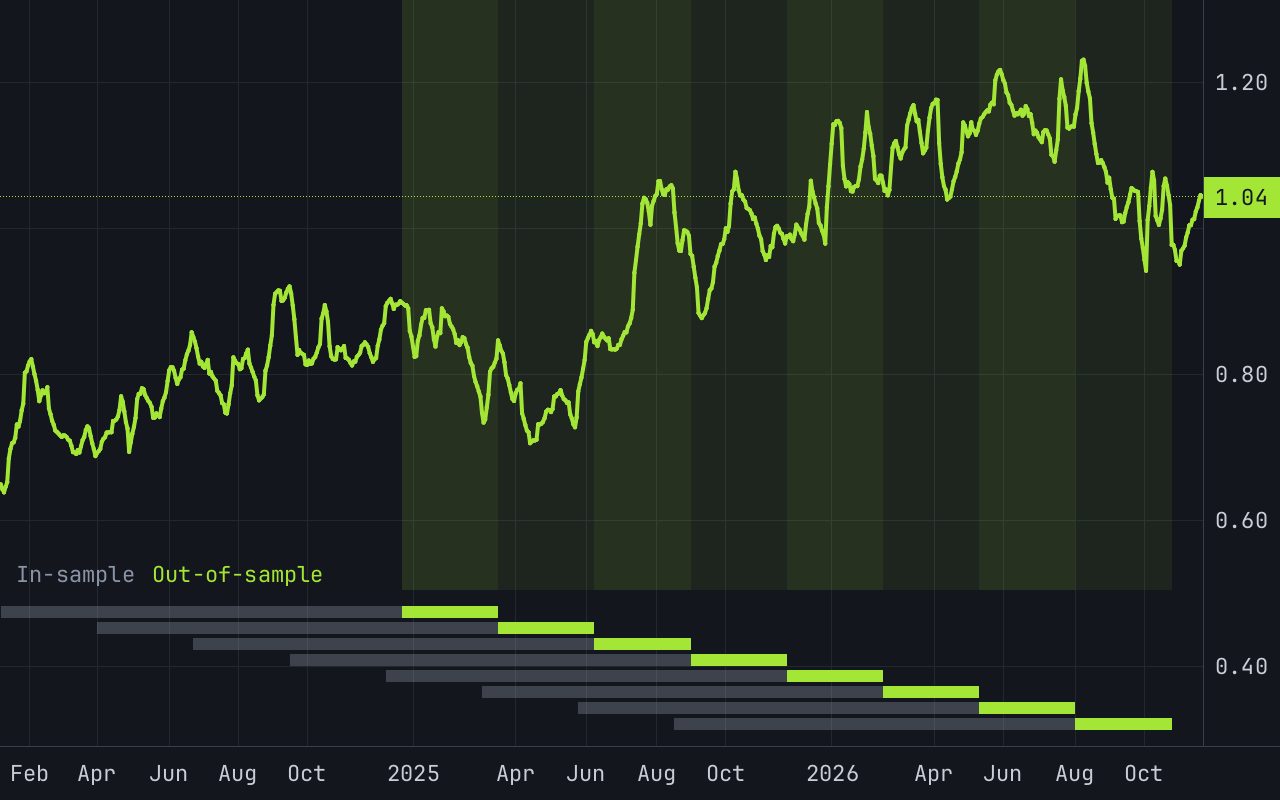
Walk-forward 測試:模型以 250 天擬合,在接下來 60 天交易,然後視窗往前滾動。由圖層外掛在權益下方為每個 fold 畫一列(灰色為樣本內、綠色為樣本外),並為樣本外區段上底色。
Walk-forward 視窗:投資組合、風險與量化範例
addLayer · ctx.timeToX · applyPriceScaleOptions
程式碼
import { FerroChart } from '@ferrochart/core';

const canvas = document.querySelector('canvas');
// Market data: the synthetic FerroChart demo API. Use your own feed.
const chart = await FerroChart.create(canvas, { theme: 'dark' });
const eq = await fetch('/api/series/equityCurve?symbol=ES&interval=1d&count=750').then((r) => r.json());
const line = chart.addSeries('line', { color: '#a3e635', lineWidth: 2 });
line.setData({ time: eq.time, value: eq.strategy });
chart.applyPriceScaleOptions({ margins: { top: 0.08, bottom: 0.34 } });

// Fit on 250 days, trade the next 60, roll forward by 60.
const train = 250, test = 60;
const folds = [];
for (let s = 0; s + train + test <= eq.time.length; s += test) folds.push(s);

const t = (i) => eq.time[Math.min(i, eq.time.length - 1)];
chart.addLayer({
  pane: 0,
  position: 'belowSeries',
  build(ctx) {
    const out = [], { y, height } = ctx.rect;
    const row = 6, top = y + height - folds.length * (row + 2) - 6;
    folds.forEach((s, k) => {
      const [a, b, c] = [ctx.timeToX(t(s)), ctx.timeToX(t(s + train)), ctx.timeToX(t(s + train + test))];
      if (a === null || b === null || c === null) return;
      const ry = top + k * (row + 2);
      out.push({ type: 'rect', x: a, y: ry, width: b - a, height: row, color: 'rgba(139, 147, 167, 0.35)' });
      out.push({ type: 'rect', x: b, y: ry, width: c - b, height: row, color: '#a3e635' });
      // The out-of-sample stretch, shaded behind the equity.
      out.push({ type: 'rect', x: b, y, width: c - b, height: top - y - 8, color: k % 2 ? 'rgba(163, 230, 53, 0.07)' : 'rgba(163, 230, 53, 0.13)' });
    });
    out.push({ type: 'text', x: ctx.rect.x + 8, y: top - 16, text: 'In-sample', color: '#8b93a7', size: 11 });
    out.push({ type: 'text', x: ctx.rect.x + 76, y: top - 16, text: 'Out-of-sample', color: '#a3e635', size: 11 });
    return out;
  },
});
chart.fitContent();
為逐筆等級的資料而生。
Apple M4 Max · Chrome + WebGPU在瀏覽器中載入 100 萬根 K 線並繪出第一個畫面
WASM · WebGPU
原生載入 1,000 萬根 K 線,含多層級細節金字塔
原生 Rust
平移、縮放與即時串流時每個畫面的堆積記憶體配置次數
穩定狀態
WebAssembly 套件大小(gzip)
包含全部功能
瀏覽器數據:Google Chrome + WebGPU;1,000 萬根 K 線的載入為原生 Rust。長條表示各項數據相對於目標的比例:載入 300 毫秒、零配置、套件 1.5 MB。
範例
313 個範例,
涵蓋 20 個應用情境。
每個範例都是 FerroChart 在你的瀏覽器中即時渲染的圖表,並附上原始碼。所有資料均為模擬資料。


價格走勢
25 個範例 →適用於任何市場的 K 線、棒線與折線,即時串流更新。


訂單流
20 個範例 →足跡圖、深度熱力圖與市場輪廓,走 compute shader 路徑。


加密貨幣衍生性商品
15 個範例 →資金費率、未平倉量、清算與基差,顯示在價格下方的窗格中。


選擇權與波動率
18 個範例 →隱含波動率與實現波動率對照、偏斜、預期波動幅度與造市商曝險的時間變化。


投資組合、風險與量化
24 個範例 →權益曲線、回撤、滾動統計、因子研究與風險檢查。


自訂系列與外掛
11 個範例 →堆疊、分組、箱形與筆刷選取系列:在同一個 GPU 影格上疊加圖層外掛。
瀏覽全部 20 個應用情境
價格走勢
K 線類型與轉換
技術分析
訂單流
執行與交易檢討
加密貨幣衍生性商品
鏈上資料
DeFi 與 AMM
迷因幣與錢包
股票與基本面
中國 A 股
選擇權與波動率
利率、外匯與總體經濟
期貨與大宗商品
基金與 ETF
投資組合、風險與量化
私募市場與個人理財
預測市場
自訂系列與外掛
實驗室與旗艦範例
K 線 + 成交量
1 / 25The classic view. A day of real one-minute bars, updating every second, on a GPU-rendered price scale with a volume histogram below. Drag to pan, scroll or pinch to zoom.
FerroChart.createaddCandlestickSeriesaddVolumeSeries拖曳平移 · 滾輪或雙指縮放 · 按兩下重設即時資料 · OKXcandles
特色
為行情資料而設計。
跨平台渲染
同一個 Rust 核心:瀏覽器中使用 WebGPU 與 WebGL2 後端,原生應用程式透過 wgpu 在 Metal、Vulkan 與 DirectX 12 上執行,伺服器上則使用 CPU 渲染器。黃金影像測試確保各後端輸出一致。
效能與資料量無關
K 線資料常駐 GPU,座標轉換在著色器中完成,平移與縮放只需更新少量 uniform。多層級細節金字塔讓數千萬根 K 線依然流暢。
30 個內建指標
從 SMA 到一目均衡表的均線、通道與震盪指標。每個 tick 增量更新,並以參考資料測試。
29 種繪圖工具
趨勢線、通道、費波那契工具、叉子線、江恩角度線、型態、艾略特波浪、區間、部位與文字,支援復原與重做。繪圖與圖表狀態可序列化為 JSON。
多圖連動
同步群組可在多個圖表之間連動十字游標與可見範圍。
易於擴充
自訂系列、圖層與繪圖工具的外掛介面。提供 JavaScript、Rust 與 Python 繫結,以及供 C#、C++、Qt 與 Flutter 使用的 C ABI。
開始使用
每種語言,同一套 API。
所有繫結都遵循同一模型:建立圖表、加入系列、設定資料、加入指標。資料以欄的形式傳入,可以是型別化陣列、Rust 切片或 DataFrame。
- JavaScript 與 TypeScript
- Rust
- Python 與 Jupyter
- C、C#、C++
import { FerroChart } from '@ferrochart/core';

const chart = await FerroChart.create(canvas, { theme: 'dark' });
const candles = chart.addCandlestickSeries();
chart.addVolumeSeries(candles);
candles.setData(bars); // [{ time, open, high, low, close, volume }, ...]
chart.addIndicator(candles, 'ema', { n: 20 });
chart.addIndicator(candles, 'macd'); // in a new pane